


 PDF
PDF For those of you that have noticed the sleek, new LinkedIn design—don’t be alarmed! In an attempt create a better LinkedIn experience and to make important information more prominent, the business-oriented platform has made several aesthetic changes on both personal and company pages. Here is an overview of the changes and what you can do to maximize your presence.
Changes on Personal Pages:
- Profile Image Larger: Profile pictures are a little larger than what they used to be. That said, make sure your profile image is high-resolution, professional, and good-looking. Although, I already know you’re good-looking.
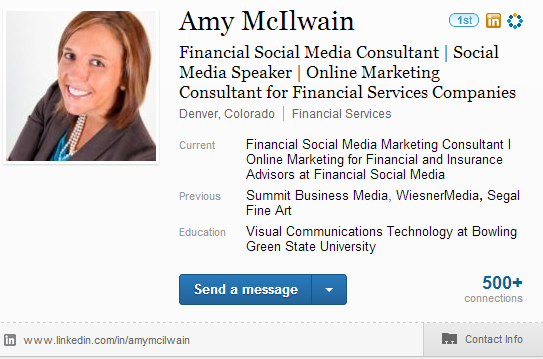
- Grey area is shorter: Before, the grey area at the top held a lot of information—including your headlines, websites etc. Now all it contains is your current positions, past positions, and education. This layout looks cleaner and is less overwhelming. However, because it contains less information, it’s important to make sure everything displayed is updated and accurate.
- Contact: Users contact information is now easier to access. All you have to do is click “contact info” in the lower right hand corner of the grey headline box. This information includes websites, social media sites, phone number, and e-mail. Again, make sure this information is accurate and complete.
- Summary: Because the gray profile box is smaller and more concise, your summary takes on greater focus than before. Besides your profile image, it’s the first thing that the viewer sees, so it must sing and makes a powerful statement about who you are and your career story. As a reminder, make sure your summary contains a career summary along with personal interests and a company summary. To improve your search rankings, use short tail and long tail keywords generously.
- Endorsements: Along with the new aesthetic changes is a new feature called “endorsements”. Now listen carefully, because this is a goldmine. In a nutshell, this feature lets professionals endorse the skills of their colleagues and friends, which provides additional authenticity and credibility. When people visit your profile, they have the option of endorsing the skills you claim to have. To do this, click the drop down arrow next to the “send a message button”. This is a great way to build stronger rapport with your connections and gain credibility. As always, giving creates opportunities for receiving.
Changes on Company Pages:
LinkedIn has also redesigned the company pages for better user engagement and better job searching. The idea is to create more credibility, user focus, personalization, and effectiveness in the recruitment process. Here are some of the advancements:
- Banner Image: Similar to Facebook, LinkedIn now has a banner image on the company homepage to engage the viewer and drive more traffic to your website. The picture dimensions are 974 x 240 pixels.
- Company Headline and Tagline: On company pages, you’re now able to add a company headline and tagline. This is a great opportunity to share the message of your brand and shine your colors.
- Shorter Company Description: Your company description can only be 500 characters now, instead of 3,000. However, you can add other media to your profile such as images, video, and social media links to drive more traffic to external platforms. Because your company description is much shorter, aim to make it powerful, punchy, and keyword rich.
- Employee Testimonials: This new feature allows employees to endorse companies. Encourage everyone at your firm to take advantage of this, as it creates increased credibility.
- Simpler navigation: The overall navigation of the LinkedIn company pages has become much simpler. It’s much easier to find what you are looking for, whether it’s company news, information, career opportunities, products and services, or insights.
- Ability to showcase company products, services, and career opportunities: LinkedIn now allows you to showcase products, services, and job openings. As a financial advisor, this is a great opportunity to tell LinkedIn users about your fabulous products and services. Make sure you list all of them. Also, aim to strategically follow companies. Just think: if somebody leaves a company, it may open the doors for a 401k rollover.
If you adapt accordingly, the changes made on the LinkedIn platform will benefit both you and your business. Unlike the old cut-and-dry company pages, you now have the opportunity to show what you offer and what your business is all about. Take some time to review your LinkedIn presence to ensure that you’re sending the right message about you and your business. If you have any questions, don’t hesitate to contact us!


