


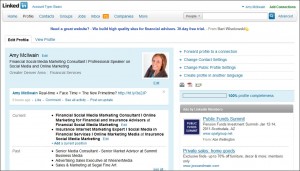
 The proliferation of LinkedIn as a professional resource for individuals and businesses to connect and expand their social networks has created a need for some bare-bones advice on how to create and develop an optimized LinkedIn profile. There are a myriad of reasons to make your presence known on the LinkedIn network:
• Bring in more money and job opportunities
• Keep in touch with industry leaders and other professionals
• Professional recommendations
• Network with peers
• Offshoot of your website
• Add a face to your business
Let’s start with keywords. Most people use searches to find other professionals using keywords. When creating your profile, think of keywords you’d like to pop up in searches under your profile. Imagine your profile is an advertisement. Use real, captivating words to increase search optimization for your profile. The five main places to utilize keywords are:
• Headline
• Current title
• Past title
• Summary
• Specialties
A great service that LinkedIn offers is the solicitation of recommendations and reviews from friends and colleagues in your network. We do it for movies. We do it for restaurants and books. Why not do it for professionals? LinkedIn recommendations are an excellent way to showcase your accreditations, accomplishments, and performances for the whole network to see. There’s no greater testimonial for your capabilities than in the words of someone else who’s worked with you. Don’t be afraid to request recommendations, and offer to others that you’ll do the same for them. Proceed with caution, however, if you are securities licensed and make sure to check with your broker/dealer’s policy.
LinkedIn also offers application plug-ins for popular web applications. LinkedIn Applications enable you to enrich your profile, share and collaborate with your network, and get the key insights that help you be more effective. Applications are added to your homepage and profile enabling you to control who gets access to what information. Some examples include the WordPress application, which can sync your blog posts to your profile, or Google Presentation, which can embed a presentation on your profile. Check out the LinkedIn Applications directory for a complete list of possible applications to utilize on your profile.
Another great tip in creating your LinkedIn profile may seem obvious, but needs to be said regardless – be passionate! People are looking at your LinkedIn profile to learn about you, so tell them! Yes, detail your resume and summary, but make sure you tell them what makes you tick. Maybe you’re an avid skier, or you take a weekly art class. Give your profile some creativity and showcase your skills apart from your job history. Being passionate about yourself will give others a better image and idea of who you are. LinkedIn is the most powerful professional social networking site out there, so take the reigns with your profile and create an optimized profile that drives traffic to you and your business. If you haven’t already please connect with my on LinkedIn and join out group, Financial Social Media!

Amy McIlwain
@amymcilwain
Latest posts by Amy McIlwain (see all)
- Social Media Is Dead: Financial Social Media Evolves - February 11, 2015
- Managing Compliant Messages on LinkedIn - January 29, 2015
- How to Freshen Up Your Website in 2015 - January 1, 2015


Amy - I would like your permission to send your recent LinkedIn Artcile out to my producers…if you would like to discuss in depth, feel free to call 888-427-7881
I’m glad you found the article helpful! Feel free to send out but please include a link back to our site and credit our company as the author. Thanks!
It’s really a nice and helpful piece of information. I’m glad that you shared this helpful info with us. Please keep us informed like this. Thanks for sharing.