


We’ve always been strong believers of Linkedin at Advisor Websites, not only because it’s the most used professional networking website in North America, but also for the potential it has in helping financial advisors grow their business and establish themselves as expert in their own community/industry.
As I was going through all the RSS feeds I receive daily, I found out that Linkedin had rolled out a couple of exciting new features for the company profile page:
1. Advanced statistics and data on your company page’s Analytics tab
2. Company recommendation button
I thought it would be interesting to give you a quick overview of what these new features mean for your online business presence.
1. Advanced statistics and data on your company page’s Analytics tab
As some of you know may already know, LinkedIn rolled out an Analytics page a few months ago, enabling company profiles owners to gather instant business intelligence such as amount of page views and overall visit trends.
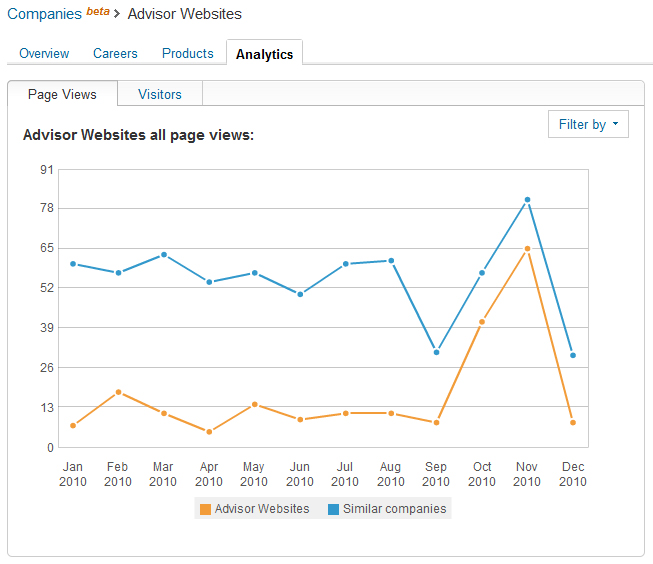
Starting this week, you will be able to access a lot more data from your company Analytics tab such as:
- the number of Linkedin members visiting your company page
- the amount of followers your company has
- which industry your company profile’s visitors are member of
- how many Linkedin members clicked on your “product & services” page
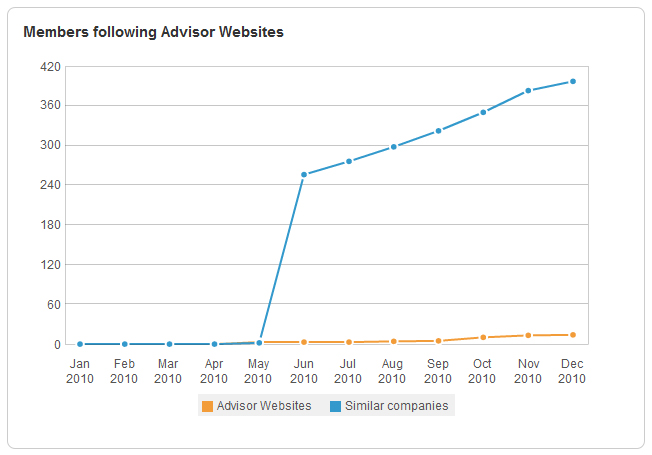
LinkedIn will also allow you to filter all this data by specific page (career, products & services or main page), visitors (industry, function or company name) and content clicked (promo banners, promo links or more info links)
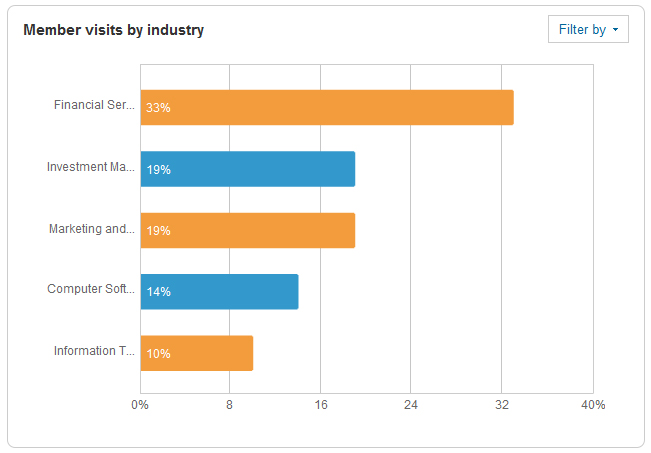
Finally, you can even see now how you company benchmarks against similar companies in your industry, which will allow you to make sound business decision about how to boost your company’s presence on Linkedin.
2. Company recommendation button
You can now display a “Linkedin Recommend” button on your website or blog and make it really easy for your clients to recommend your products and services. Simply paste the code below on your website and let your customers recommend you with just one click of a mouse!
<script type=”text/javascript” src=”http://platform.linkedin.com/in.js”></script><script type=”in/recommendproduct” data-company=”CompanyID” data-product=”ProductID” data-counter=”right”></script>
Make sure you edit the code below with your own Company ID and Product ID.
To get your Company ID, go to linkedin.com and search for your company and go to your company profile. Your Company ID is the number sequence in the URL, i.e. http://www.linkedin.com/company/556627. Once you’ve copied your ID number, make sure you replace “CompanyID” in the code above by your actual ID number (in our example 556627).
To get your Product ID, go to your own product page within your company profile. The Product ID is the number sequence that follows “prdid” in the URL, i.e. http://www.linkedin.com/company/advisor-websites/product?prdId=4573. Once you’ve copied your ID number, make sure you replace “ProductID” in the code above by your actual ID number (in our example 4573).
Note: if you are located in the U.S., bear in mind that a Linkedin recommendation is considered as endorsement and as such should not be made publicly available on your profile!
Let us how if you have any trouble activating this button or viewing the analytics on your company page. As always, feel free to share this article across your favorite social networks!


Thank you. This was very clear and very helpful. You provide a valuable service.